
Recipe organisation
How to organize recipes on iPhone so you can cook them
A simple recipe collection that helps you find a dish, check its source and get cooking again.
 By Salsa
THE SHORT ANSWER
Keep the recipes you intend to cook in one searchable place. For each one, save the full ingredients and method, give it a recognisable dish name and retain the original source. Use name or ingredient search to find it later. After cooking, mark the recipes you would make again and record any change you want to remember.
A recipe can be somewhere on your iPhone and still be hard to use. A browser bookmark points to a page, a screenshot preserves what you captured and a note may hold only half the method. A useful collection lets you answer two questions quickly: Which recipe do I want? and Can I cook it from what I saved?
You do not need to process every recipe you have ever liked. Start with a few you already cook or plan to make soon, then use the same simple routine whenever a new one earns a place in the collection.
Gather recipes worth keeping
Look where you actually leave recipes: browser bookmarks, a notes app, photos of cookbook pages, screenshots and printed cards. Pick one complete recipe from each place you use. This small sample reveals whether your chosen system can handle your real sources without turning a weekend into a filing project.
| What you have | What to preserve | A good next step |
|---|---|---|
| Website bookmark | The full ingredient list, method and original URL | Open the individual recipe page and import its link. |
| Cookbook or recipe card | Every page, the book or card source and readable measurements | Photograph the complete recipe, then check the imported text. |
| Screenshot or note | Ingredients, steps, yield and any important notes | Use clear photos or paste complete text; fill gaps from the original. |
For the detailed capture steps, see our guides to saving a website recipe and scanning cookbook pages. The goal here is a collection you can return to, not a folder of more incomplete saves.
Give every saved recipe a usable record
Before you rely on an imported recipe, compare it with its source. A neat card is only useful if the quantities and instructions survived the move. Check the yield, units, divided ingredients, oven setting, rest time and any note that changes the method. Correct missing information from the original; do not invent it.
Use a dish name you would naturally search for, such as “Tomato and chickpea pasta”, rather than a vague title like “Dinner idea”. Keep the website link or cookbook title and page number with your own notes when a suitable field is available. That gives you a way back to the creator’s explanation if something is unclear. The current Salsa App Store listing says link imports retain their original source link and describes checks against available evidence; you should still review the result yourself.
| Check | Why it helps later |
|---|---|
| Recognisable title | You can find the dish by the words you remember. |
| Complete ingredients | Ingredient search works on a useful list, not just a food photo. |
| Complete method | You can cook without hunting for a missing second page. |
| Original source | You can check a measurement, variation or credit later. |
Find a dish without remembering where it came from
When you want to cook, start with the detail you know. Search by dish name if you remember it; search by an ingredient if the fridge is your starting point. Then read the full ingredient list before deciding you have everything. A recipe containing tomato may also need chickpeas, herbs or a particular pan.
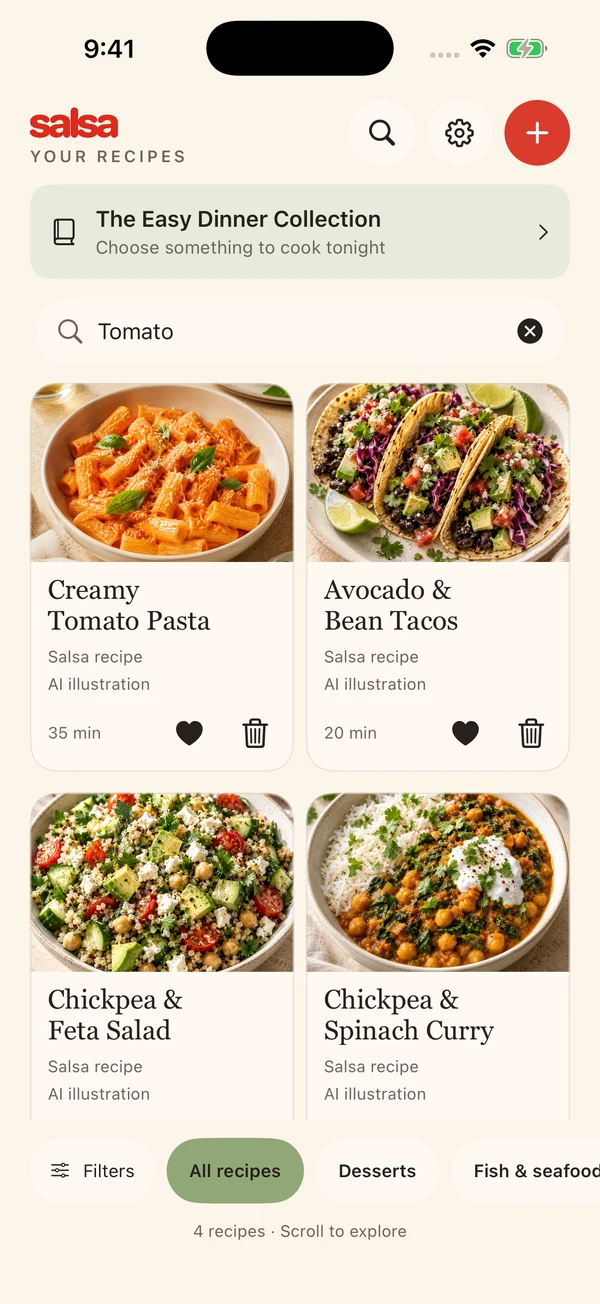
Salsa’s released iPhone app lets you search saved recipes by name or ingredient, save favourites, add private ratings and filter by recipe category, source or rating. Use favourites for recipes you want near at hand and ratings to remember how a dish worked for you. These are ways to retrieve your own collection; Salsa does not claim that a single ingredient search proves you can make a recipe from everything in your kitchen.
See the current iPhone listing for feature availability.
Let cooking improve the collection
Before you start, read the whole saved method and prepare the ingredients and equipment it calls for. Salsa shows ingredient amounts alongside guided cooking steps and lets you start relevant timers yourself. Our step-by-step cooking guide covers that routine.
After the meal, make one useful note for your future self if the recipe or your cooking experience revealed something: a preferred pan, a substitution you made, or an instruction you want to clarify. Keep your own change separate from the original recipe so you can tell which version you are following. If you would gladly cook it again, mark it as a favourite. If you want a smaller yield next time, read our halving guide before assuming the pan and cooking time can be halved too.
Once in a while, search for one ingredient and one dish you know are in the collection. If either is hard to find, improve the recipe title or the ingredient text now. That small retrieval check is more useful than creating more folders you will never browse.
Common questions
Is a screenshot enough to organise a recipe?
A screenshot is a useful visual reference if it includes the whole recipe. To search by ingredient and cook from clear steps, you need the complete ingredient and method text in your saved recipe too.
Do I need a category for every recipe?
No. Begin with a clear name and complete recipe. Use the category, source and rating filters that are helpful for your collection; avoid extra organising work that does not help you find a dish.
Can I search for what is in my fridge?
In Salsa, you can search your saved recipes by an ingredient. Open a match and check its full list. This is not a pantry inventory or a guarantee that you have every required ingredient.
Should I import my entire backlog at once?
Start with a handful you plan to cook. Verify each one and make sure you can find it again before moving more recipes. Salsa’s current listing describes three free lifetime imports and shows the current allowances for further imports.